A microservices journey... Spring Boot and Spring Cloud Overview - Part I
Hi folks!
In these series blog post I will show you how to create a microservices journey with Spring Boot and Spring Cloud.
To get a more detailed idea of what Spring Boot and Spring Cloud is, I refer to the following links:
Starting from the basics, we will create a microservices application using Spring Boot and Spring Cloud.
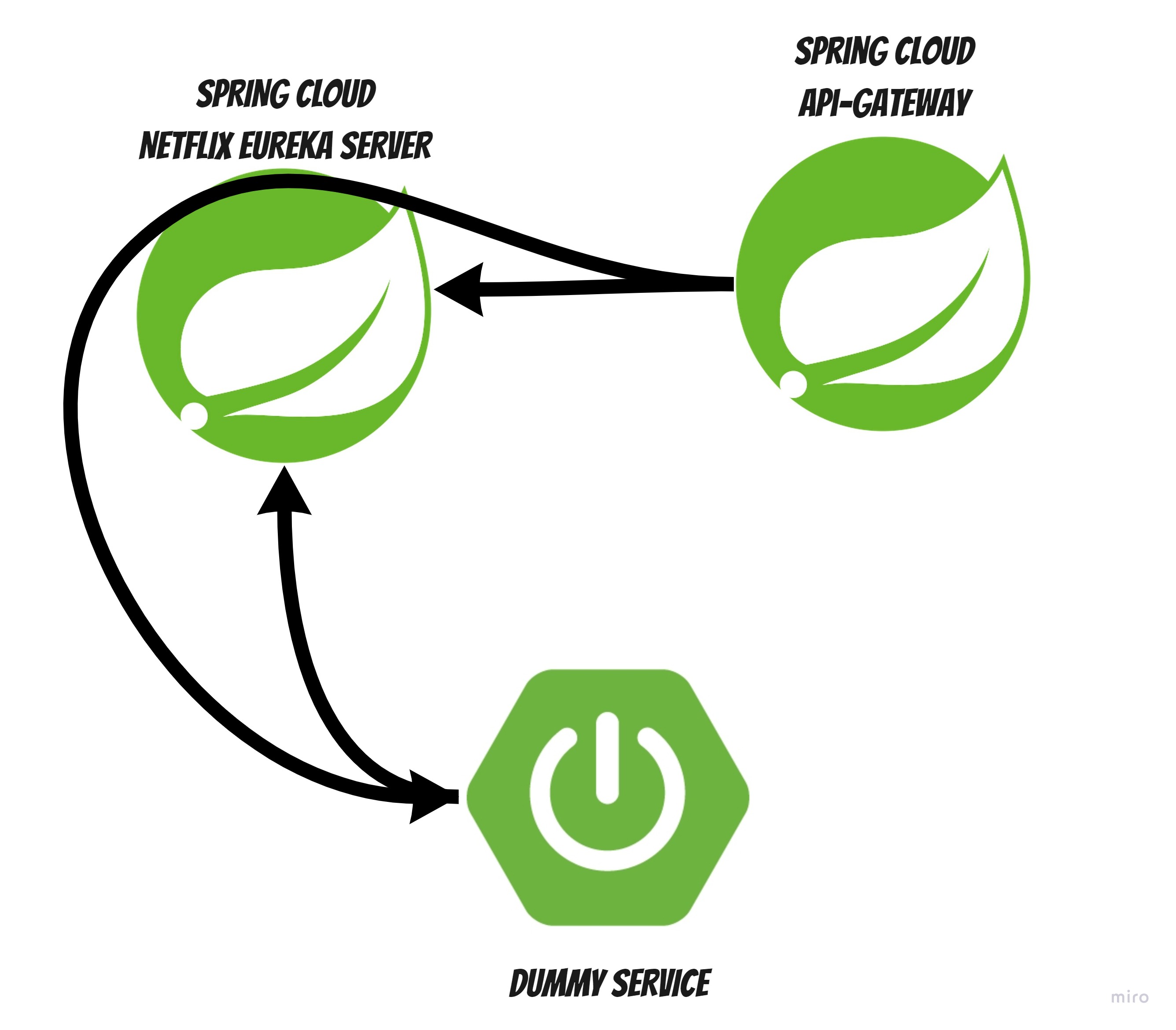
The architecture of the application will be as follows:
Where:
- Spring Cloud Eureka Server: is a service discovery and registry that is used to discover the microservices in the application.
- Spring Cloud API-Gateway: is a service that is used to expose the microservices in the application.
- Dummy Service: is a simple service that is used to demonstrate the microservices architecture.
Step 1: Create the projects
Go to Spring Initializr and create 3 new projects:
- Spring Cloud Eureka Server:
Eureka Serverdependency is mandatory - Spring Cloud API-Gateway:
Eureka Discovery ClientandGatewaydependencies are mandatory - Dummy Service:
Eureka Discovery ClientandSpring Webdependencies are mandatory
TIP: Spring Boot Actuator, Spring Boot DevTools and Lombok are good choices too, where needed.
Step 2: Implementation and configurations
Spring Cloud Eureka Server
We congigure Spring Cloud Eureka Server by adding @EnableEurekaServer to the Main class.
and with the following properties:
server:
  port: 8761

spring:
  application:
    name: discovery-server

eureka:
  client:
    service-url:
      defaultZone: http://${EUREKA_HOST}:${EUREKA_PORT}/eureka
    register-with-eureka: false
    fetch-registry: false
NOTE: Eureka_HOST and EUREKA_PORT are the variables that will be used and injected later on.
Dummy Service
We annotate the Main class with @EnableDiscoveryClient to enable the discovery client.
We create a simple RestController in the dummy service project:
@RestController
@RequestMapping("")
public class DummyController {

    @GetMapping("/hello")
    public ResponseEntity<String> hello() {
        return ResponseEntity.ok("Hello, World!");
    }
}
We configure the dummy service project to use the Spring Cloud Eureka Server:
spring.application.name: dummy-service
server.port: 9001

spring.cloud.discovery.enabled: true
eureka:
  client:
    service-url:
      defaultZone: http://${EUREKA_HOST}:${EUREKA_PORT}/eureka
Spring Cloud API-Gateway
We annotate the Main class with @EnableDiscoveryClient to enable the discovery client.
We configure the Spring Cloud API-Gateway project to use the Spring Cloud Eureka Server and with a Route to the dummy service:
server:
  port: 8765

spring:
  application:
    name: api-gateway

  # CORS
  cloud:
    gateway:
      globalcors:
        cors-configurations:
          '[/**]':
            allowedOrigins: "*"
            allowedHeaders: "*"
            allowedMethods:
              - GET
              - POST
              - PUT
              - DELETE
              - OPTIONS

      discovery:
        locator:
          lower-case-service-id: true
          enabled: true

      # ROUTES!!!
      routes:
        - id: dummy
          uri: lb://dummy-service
          predicates:
            - Path=/dummy/**
          filters:
            - StripPrefix=1

eureka:
  client:
    service-url:
      defaultZone: http://${EUREKA_HOST}:${EUREKA_PORT}/eureka
Here we done… Now we create the Dockerfiles-s and run the containers:
Step 4: Dockerfiles and docker-compose
Spring Cloud Eureka Server
FROM gradle:7.2-jdk11 as build
ARG VERSION=latest
WORKDIR /app
COPY . ./
RUN gradle bootJar

#PROD
FROM adoptopenjdk:11-jre-openj9

ENV SERVICE_PROFILES dummy
ENV INITIAL_MEMORY 64m
ENV MAX_MEMORY 512m
ENV MAX_RAM_PERCENTAGE 50

RUN apt-get update \
  && apt-get install -y --no-install-recommends curl jq \
  && rm -rf /var/lib/apt/lists/*

COPY --from=build /app/build/libs/*.jar /app.jar

EXPOSE 8761

ENTRYPOINT ["java", "-XX:+UseSerialGC", "-Xshareclasses", "-Xquickstart", "-Xms${INITIAL_MEMORY}", "-Xmx${MAX_MEMORY}", "-XX:MaxRAMPercentage=${MAX_RAM_PERCENTAGE}", "-jar", "-Dspring.profiles.active=${SERVICE_PROFILES}", "/app.jar"]

HEALTHCHECK --start-period=30s --interval=30s --timeout=3s --retries=3 \
  CMD curl --silent --fail --request GET http://localhost:8761/actuator/health \
  | jq --exit-status '.status == "UP"' || exit 1
Spring Cloud API-Gateway
FROM gradle:7.2-jdk11 as build
ARG VERSION=latest
WORKDIR /app
COPY . ./
RUN gradle bootJar

#PROD
FROM adoptopenjdk:11-jre-openj9

ENV SERVICE_PROFILES dummy
ENV INITIAL_MEMORY 64m
ENV MAX_MEMORY 512m
ENV MAX_RAM_PERCENTAGE 50

RUN apt-get update \
  && apt-get install -y --no-install-recommends curl jq \
  && rm -rf /var/lib/apt/lists/*

COPY --from=build /app/build/libs/*.jar /app.jar

EXPOSE 8765

ENTRYPOINT ["java", "-XX:+UseSerialGC", "-Xshareclasses", "-Xquickstart", "-Xms${INITIAL_MEMORY}", "-Xmx${MAX_MEMORY}", "-XX:MaxRAMPercentage=${MAX_RAM_PERCENTAGE}", "-jar", "-Dspring.profiles.active=${SERVICE_PROFILES}", "/app.jar"]

HEALTHCHECK --start-period=30s --interval=30s --timeout=3s --retries=3 \
  CMD curl --silent --fail --request GET http://localhost:8765/actuator/health \
  | jq --exit-status '.status == "UP"' || exit 1
Dummy Service
FROM gradle:7.2-jdk11 as build
ARG VERSION=latest

WORKDIR /app

COPY ./ .

RUN gradle bootJar

#PROD
FROM adoptopenjdk:11-jre-openj9

ENV SERVICE_PROFILES dummy
ENV INITIAL_MEMORY 64m
ENV MAX_MEMORY 512m
ENV MAX_RAM_PERCENTAGE 50

RUN apt-get update \
  && apt-get install -y --no-install-recommends curl jq \
  && rm -rf /var/lib/apt/lists/*

COPY --from=build /app/build/libs/*.jar /app.jar

EXPOSE 9001

ENTRYPOINT ["java", "-XX:+UseSerialGC", "-Xshareclasses", "-Xquickstart", "-Xms${INITIAL_MEMORY}", "-Xmx${MAX_MEMORY}", "-XX:MaxRAMPercentage=${MAX_RAM_PERCENTAGE}", "-jar", "-Dspring.profiles.active=${SERVICE_PROFILES}", "/app.jar"]

HEALTHCHECK --start-period=30s --interval=30s --timeout=3s --retries=3 \
  CMD curl --silent --fail --request GET http://localhost:9001/actuator/health \
  | jq --exit-status '.status == "UP"' || exit 1
Now the docker-compose.yml:
version: "3.9"
services:

  discovery-server:
    image: spring-overview/discovery-server
    build:
      context: discovery-server
    env_file:
      - .env
    ports:
      - ${DISCOVERY_SERVER_EXTERNAL_PORT:-18761}:8761

  api-gateway:
    image: spring-overview/api-gateway
    build:
      context: api-gateway
    env_file:
      - .env
    ports:
      - ${API_GATEWAY_EXTERNAL_PORT:-18765}:8765
    depends_on:
      discovery-server:
        condition: service_healthy

  dummy-service:
    image: spring-overview/dummy-service
    build:
      context: dummy
    env_file:
      - .env
    environment:
      - SERVICE_PROFILES
    depends_on:
      discovery-server:
        condition: service_healthy
with the following .env file:
EUREKA_HOST=discovery-server
EUREKA_PORT=8761

DISCOVERY_SERVER_EXTERNAL_PORT=18761
API_GATEWAY_EXTERNAL_PORT=18765
Running the containers
Now we can execute the following command to run the containers:
docker-compose up --build
And we can check the services by making a call to the API-Gateway: https://localhost:18765/dummy/hello
PRO TIP: you can use httpie for making calls to the API-Gateway.
…Enjoy!
The source code can be found here.
Stay tuned… for next steps into microservices with Spring Boot and Spring Cloud.